



Get More from Your Field Team
Structure technician assignments and daily service workloads to reduce coordination overhead and help teams focus on their scheduled responsibilities.
Simplify service operations with ECCRM - Field Service Automation Software, designed to manage service requests, coordinate technicians, track work orders and organize AMC contracts in one connected Service CRM platform. Improve visibility, maintain customer service history and streamline field service workflows from request to completion. Whether you run an HVAC service company, elevator maintenance business, RO water purifier service center or equipment maintenance team, ECCRM helps organize daily activities, strengthen customer relationships and improve service efficiency.
Automate Every Job. Connect Every Team. Simplify Every Service!
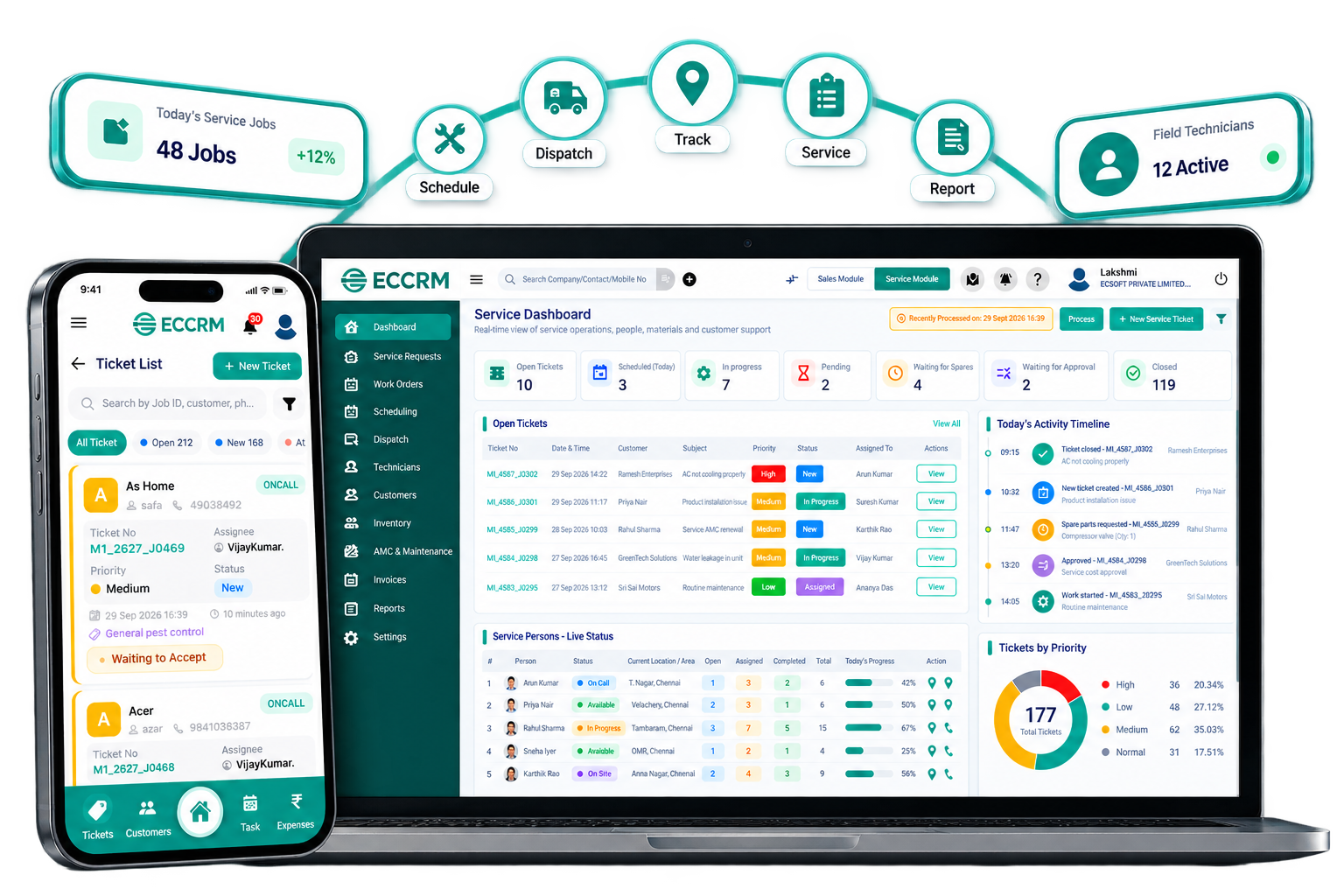
From capturing customer requests to coordinating field teams, recording completed jobs and reviewing service performance, ECCRM - Field Service Automation Software helps connect your customer service workflows and field operations in one organized CRM platform.
Record customer issues and service requirements in one place.
Track service requests and identify pending activities.
Coordinate technicians and organize service assignments.
Plan appointments and align office and field teams.
Document job details, instructions and required tasks.
Review reports and identify pending work.
Organize maintenance schedules and contract follow-ups.
Link service jobs with quotations and invoices.
Maintain completed job records and technician observations.
Access customer and job details through mobile CRM.
Connect service requests, field teams and job progress in one organized workflow.
Connected field teams. Organized workflows. Better service visibility.
Book Your Free ECCRM Demo →Simplify daily service operations with ECCRM - Field Service Automation Software. Organize service requests, coordinate technician assignments, manage work orders and maintain customer service history through connected workflows. From field team coordination and mobile service access to maintenance tracking, billing and performance reporting, ECCRM helps businesses bring service information together, reduce manual follow-ups and maintain better visibility across their service operations.
Capture customer issues, organize service requirements and keep requests accessible for timely follow-ups.
Organize service appointments and coordinate technician schedules according to your operational requirements.
Organize job allocation, clarify technician responsibilities and keep assigned service activities structured.
Maintain job instructions, assigned tasks and work status information throughout the service process.
Help field employees access relevant customer details, assigned jobs and service information through supported mobile CRM features.
Review available field activity information and service updates to support better operational coordination.
Keep customer details, previous service activities and relevant job records available for future reference.
Organize annual maintenance contract details, service commitments and renewal follow-ups.
Organize recurring maintenance activities and follow-up schedules to support planned service delivery.
Maintain warranty details and equipment service records to help teams review coverage and service eligibility.
Maintain spare-parts information and coordinate the materials required for service jobs, where inventory features are available.
Organize service charges and connect completed jobs with relevant quotation and invoicing processes where configured.
Review service records, job status and available operational reports to understand performance and follow-up needs.
View available service information, pending jobs and operational data to support informed management decisions.
Organize service activities across branches, customer sites and multiple operating locations, as supported by your setup.
Explore connections between service workflows, customer records, ERP, billing and other business processes where supported.
Discover how ECCRM Field Service Automation Software can support work coordination, customer service workflows and operational visibility.
Connect service requests, technician scheduling, work orders and customer records through one organized field service automation platform. Help service teams coordinate daily operations, maintain job visibility and deliver consistent customer support.
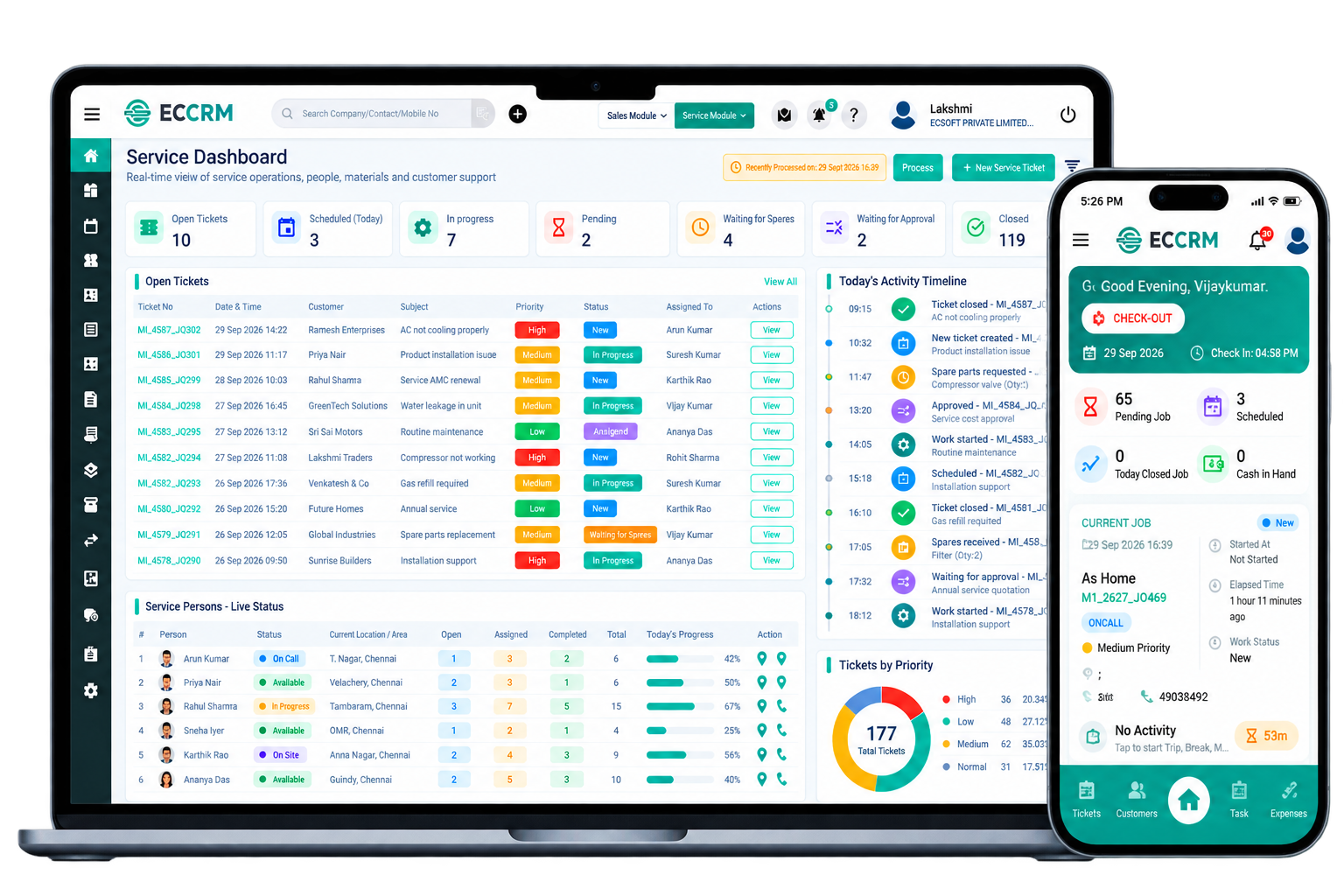
Get a consolidated view of customer requests, open service jobs, technician assignments and completed activities. Keep essential service information organized to support faster decisions and better team coordination.
See how ECCRM can help organize field service workflows and support customer-focused service delivery.
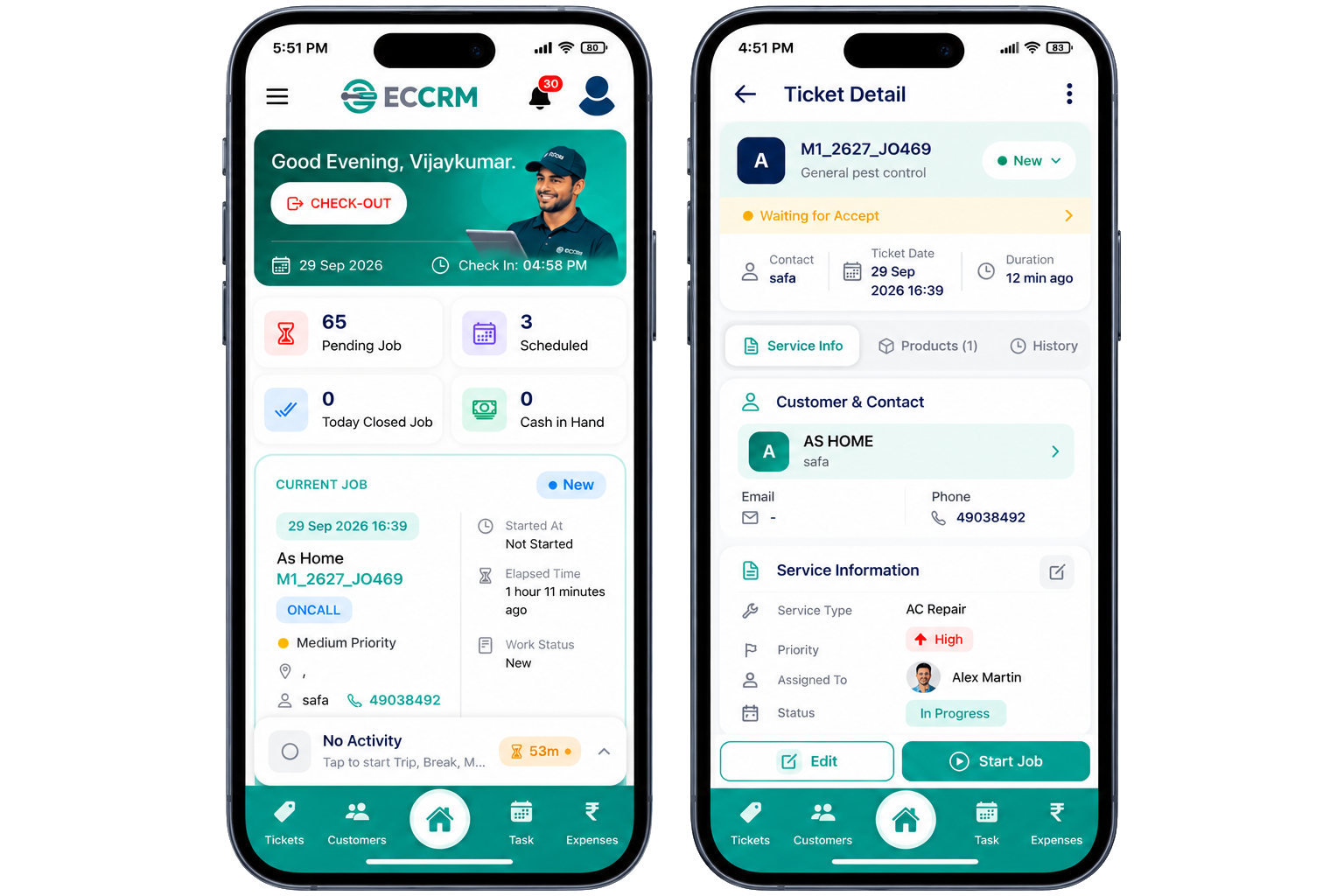
Take field service automation beyond the office with ECCRM. Help technicians access assigned work, review customer and equipment details, update service activities and document site visits through mobile workflows. Keep service information organized between field staff and office teams, improve job coordination and maintain a clearer record of customer service activities.

Coordinating technicians, customer appointments, work orders and maintenance activities manually can create operational bottlenecks. Identify the gaps that limit field team productivity, delay service workflows and make it harder to deliver a consistent customer experience.
Assigning service jobs through calls, messages and spreadsheets makes it harder to balance workloads, manage urgent requests and coordinate daily field visits.
When office staff and technicians work with scattered information, job instructions, customer updates and service follow-ups can become difficult to coordinate.
Without a centralized view of service activities, managers may find it difficult to identify pending jobs, check completion status and prioritize unresolved requests.
Managing AMC agreements, warranty details and upcoming maintenance visits separately can make service commitments harder to track and customer follow-ups easier to overlook.
Incomplete visibility into spare parts and service materials can complicate job preparation, increase coordination effort and make inventory planning less reliable.
Manually compiling job sheets and technician updates makes it harder to assess service workloads, review completion trends and make informed operational decisions.
Disconnected tools and manual coordination can make field service operations harder to manage as your business grows. ECCRM - Field Service Automation Software helps organize service requests, technician assignments, work orders and customer records within a connected service management workflow.
Field service efficiency directly influences customer experience, resource utilization and operational costs. ECCRM - Field Service Automation Software helps businesses structure service workflows, coordinate field personnel, organize maintenance commitments and maintain reliable customer records. Build a more accountable service operation with better workflow visibility and a foundation for sustainable business growth.
Structure technician assignments and daily service workloads to reduce coordination overhead and help teams focus on their scheduled responsibilities.
Give technicians access to relevant customer details, equipment history and job requirements to support better preparation before arriving on site.
Maintain service history and follow-up records to support informed conversations, consistent customer communication and stronger long-term engagement.
Organize annual maintenance contracts, renewal dates and service coverage details to improve visibility into ongoing commitments and renewal opportunities.
Keep service assignments, job updates and completion records organized so managers can review responsibilities, follow pending activities and identify unresolved work.
Organize spare parts usage, job requirements and service activity records to support resource planning, cost reviews and more informed operational decisions.
Review available service reports and job records to understand workload patterns, assess completion status and identify areas requiring management attention.
Establish repeatable service processes and organized customer records to help manage increasing job volumes, expanding service teams and a growing customer base.
Every service industry has different operational demands. ECCRM - Field Service Automation Software helps businesses organize customer requests, coordinate technicians, manage service jobs and maintain customer service records through structured field service workflows tailored to their day-to-day operations.
Coordinate air conditioning installations, breakdown requests, technician visits and scheduled equipment servicing.
Explore HVAC Solutions 02Organize purifier repair requests, filter replacement visits, customer service history and AMC follow-ups.
Explore Water Purifier Solutions 03Track electrical repair requests, allocate field jobs and maintain service records across customer locations.
Explore Electrical Solutions 04Manage appliance breakdowns, repair appointments, technician assignments and repeat customer requests.
Explore Appliance Solutions 05Organize equipment maintenance requests, service visits, repair histories and follow-ups for healthcare customers.
Explore Medical Equipment Solutions 06Coordinate plumbing complaints, repair assignments, on-site visits and ongoing customer service requirements.
Explore Plumbing Solutions 07Organize hardware repair tickets, customer device records, technician assignments and service completion updates.
Explore IT Service Solutions 08Coordinate elevator breakdown calls, technician dispatch, AMC commitments and preventive maintenance visits.
Explore Elevator Solutions 09Plan recurring cleaning assignments, coordinate site teams and keep customer appointments and service records organized.
Explore Cleaning Solutions 10Track installations, equipment service requests, maintenance appointments and customer site visits.
Explore Solar & UPS Solutions 11Manage treatment appointments, recurring site visits, service agreements and customer follow-up activities.
Explore Pest Control Solutions 12Organize machinery breakdown requests, maintenance work orders, equipment histories and field service activities.
Explore Industrial Solutions 13Coordinate facility service requests, site inspections, repair assignments and planned maintenance activities.
Explore Facility SolutionsOne connected field service platform. Multiple industry workflows.
Explore All IndustriesBring customer management, field service operations and technician workflows together in one connected platform.
Connect customer relationships with service operations in one unified platform.
Learn MoreManage service requests, scheduling, work orders, AMC, billing and follow-ups from one system.
Learn MoreKeep technicians connected with customer details, jobs, service history and updates in the field.
Learn MoreDesigned around the workflows of HVAC, elevator, electrical, plumbing and other service businesses.
Explore IndustriesBacked by ECSOFT's experience in business software, CRM, ERP and service management solutions.
About ECCRMAdapt the platform to your business processes, team size and changing service requirements.
Talk to an ExpertExplore how ECCRM - Field Service Automation Software helps businesses organize service requests, coordinate technician assignments, manage work orders and maintain service records. Get a closer look at a connected approach to managing field operations and improving service delivery.
Our proven implementation process ensures a smooth and successful deployment of your software.
Explore answers to common questions about field service automation software, technician management, service scheduling, work orders and how ECCRM helps businesses organize field service operations.
Field service automation software helps businesses organize and manage service activities performed at customer locations. It supports workflows such as service request tracking, technician assignments, service scheduling, work order management and service reporting. By bringing service information into a structured system, businesses can reduce manual coordination, improve job visibility and manage customer service operations more efficiently.
Field service automation software improves operational efficiency by organizing service requests, assigning jobs, maintaining work order details and tracking service progress. It helps office teams coordinate with field technicians, access customer service history and maintain consistent records. These capabilities can reduce repetitive administrative work, support better resource utilization and help service businesses manage more jobs with greater operational visibility.
The best field service automation software for your business should match your service workflow. Important capabilities to evaluate include service request management, technician scheduling, job assignment, work order tracking, mobile service access, customer and equipment history, maintenance contract management, service reports and performance reporting. Depending on your requirements, you may also need spare parts tracking, quotations, billing workflows and integration with existing business systems.
Field service automation software focuses on organizing service requests, work orders, technician assignments, maintenance activities and job completion. Field force automation software generally focuses on coordinating mobile employees, their activities, assignments and field updates. The two areas can overlap, particularly in businesses that manage service engineers, maintenance technicians or customer-facing field teams. The right solution depends on the activities your employees perform outside the office.
Yes. Field service software can help businesses organize service visits, allocate jobs to technicians and maintain work order information in one workflow. Teams can use structured job details to understand service requirements, follow assignment progress and record service outcomes. Automated scheduling, route optimization and capacity-based allocation vary by product, so businesses should verify these capabilities before selecting a field service automation platform.
Field service automation solutions can help service businesses organize annual maintenance contracts (AMC), customer equipment records, planned service visits and maintenance follow-ups. A structured maintenance workflow makes it easier to review contract details, identify upcoming service requirements and maintain visit history. Before choosing a platform, confirm that its AMC tracking, recurring scheduling, renewal reminders and preventive maintenance capabilities match your business requirements.
ECCRM can be evaluated by HVAC contractors, lift and elevator maintenance companies, RO water purifier service providers and other service-driven businesses. Relevant workflows may include customer management, service request handling, technician assignments, job tracking and maintenance follow-ups. Because every industry has different operational needs, request an ECCRM demonstration to confirm the required industry-specific processes and features before implementation.
A field service mobile app can help technicians access assigned job information, review customer details, update service activities and maintain digital visit records while working at customer locations. Mobile access can improve coordination between office teams and field employees by keeping relevant service information accessible. ECCRM offers a Service App; contact the ECCRM team to confirm the specific mobile workflows and capabilities available for your service operations.
Field service automation software can help control service costs by reducing manual administration, improving job coordination and making service records easier to access. Organized assignments and maintenance follow-ups can also help teams respond more consistently to customer requirements. When service teams have clearer job information and better visibility into work progress, businesses are better positioned to improve service communication, accountability and the overall customer experience.
Choose a field service automation platform by assessing your service volume, team size, job assignment process, scheduling requirements, work order workflow, maintenance contracts and reporting needs. Evaluate mobile usability, customer history, integration options, implementation support and scalability. Compare the actual features available against your daily operations rather than selecting software based on a feature list alone. Request an ECCRM demo to discuss your workflow and identify whether the available capabilities fit your business requirements.
Bring greater structure to your field service operations with ECCRM - Field Service Automation Software. Organize service requests, coordinate technician assignments, manage work orders and maintain customer service history through connected service management workflows. Help your team spend less time on manual coordination and more time delivering reliable customer service.