


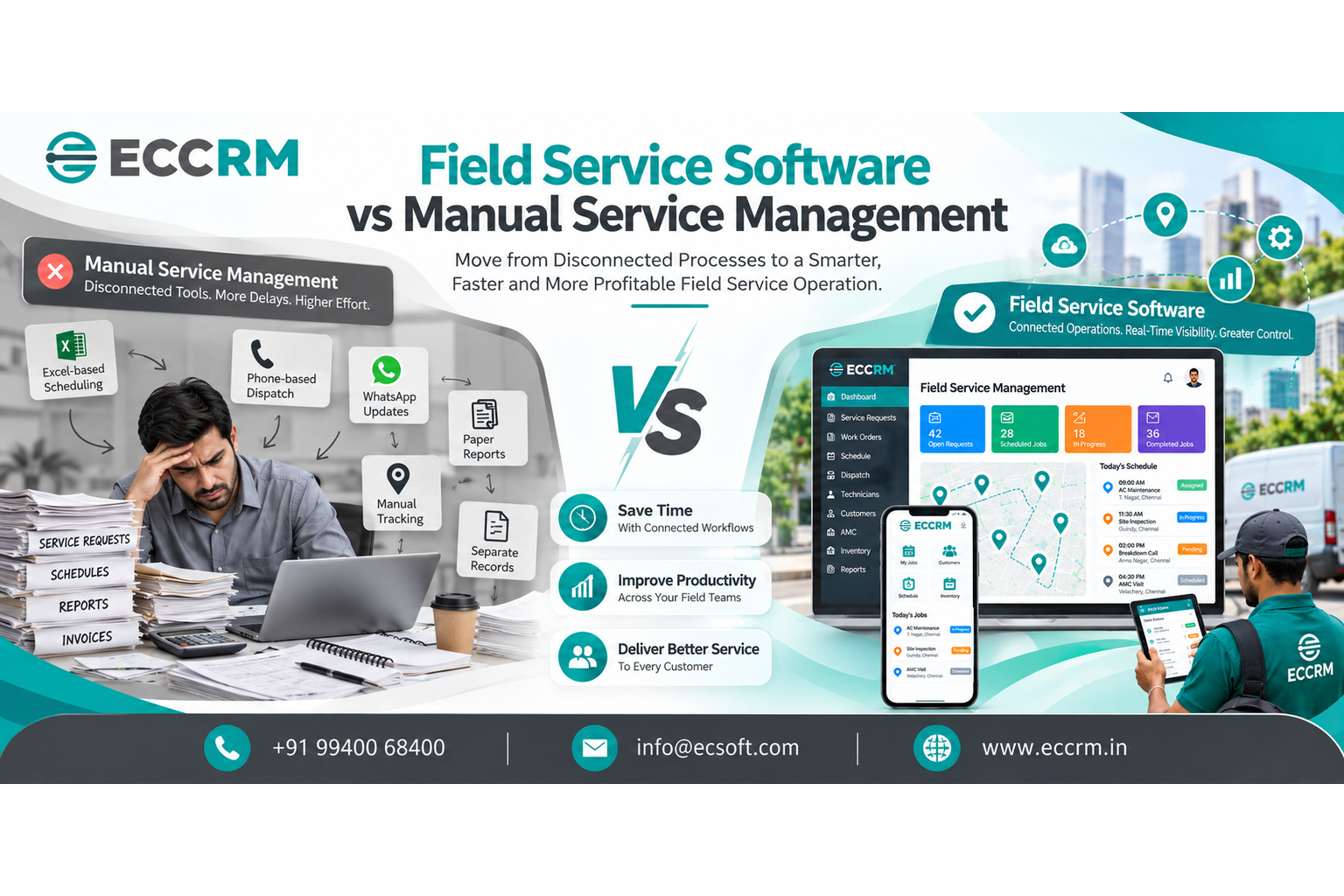
Field Service Software vs Manual Service Management
When a customer calls with an urgent service complaint, how quickly can your team identify the problem, assign the right technician and confirm when the work will be completed?
For some service businesses, the answer involves opening an Excel sheet, checking a WhatsApp conversation, calling a technician and searching for an old paper service report. Each step may seem manageable on its own. Together, however, they can slow down the entire service process.
This is where the difference between field service software and manual service management becomes important.
Manual methods can be sufficient for a small operation with a limited number of customers and technicians. But as service requests, customer locations, maintenance contracts and field employees increase, coordinating everything through separate tools becomes more difficult.
Field Service Management Software brings essential service activities into a connected workflow, helping businesses manage requests, technician scheduling, dispatch, work orders, service reports and customer history more systematically.
So, should your business continue with manual service management or move to field service software? Let's compare both approaches from a practical business perspective.
What is the Difference Between Field Service Software and Manual Service Management?
The main difference is how information is recorded, shared and used to manage service work.
With manual processes, information is often distributed across different people and tools. With a connected field service management system, relevant information can be maintained in one place and made available to the appropriate office staff and field technicians.
The objective is not simply to replace paper with a screen. It is to make service work easier to coordinate, track and complete.
Manual Service Management: How Does It Work?
Many service businesses begin with a straightforward process.
A customer calls the office. An employee records the complaint in a spreadsheet or notebook. The service manager contacts a technician, confirms availability and communicates the appointment. After visiting the customer, the technician submits a report. The office then updates the service record and prepares the invoice.
This process can work when the number of daily jobs is manageable and the team can easily communicate with one another.
Problems usually arise when several activities happen simultaneously.
Consider a business handling equipment maintenance across multiple customer locations. One technician may be attending an emergency breakdown, another may be travelling to a scheduled appointment, and a third may be waiting for a spare part.
At the same time, the office may need to check which AMC visits are due, whether yesterday's reports have arrived and which completed jobs are waiting for invoicing.
Without connected records, employees may spend considerable time collecting information before they can make decisions.
Common manual service management methods
- Excel spreadsheets for technician schedules and job tracking
- Phone calls for dispatch and appointment coordination
- WhatsApp messages for service updates
- Paper forms for work orders and service reports
- Separate files for customer and equipment history
- Manual reminders for AMC renewals and preventive maintenance
- Independent records for spare parts, expenses and billing
These tools are not inherently bad. The challenge is that they may not share information automatically, leaving employees responsible for keeping everything updated.
What is Field Service Management Software?
Field Service Management Software, often called FSM software, helps businesses organize the activities involved in delivering service at customer locations.
Depending on the platform, it may include:
- Service request and ticket management
- Technician scheduling and assignment
- Field service dispatch
- Mobile access for technicians
- GPS and location visibility
- Work order management
- Digital service reports
- Customer and equipment service history
- AMC and preventive maintenance scheduling
- Spare parts and inventory tracking
- Billing workflows and operational reporting
The value comes from connecting these functions rather than treating each activity as a separate task.
For example, a service request can be linked to a customer, assigned to a technician, converted into a work order, updated after the site visit and recorded in the customer's service history. Where supported, the same workflow can also connect parts usage and billing information.
Instead of repeatedly asking different employees for updates, managers have a clearer record of the job's progress.
Field Service Software vs Manual Service Management: A Side-by-Side Comparison
The following comparison highlights how the two approaches differ in everyday service operations.
| Operational Area | Manual Service Management | Field Service Software |
|---|---|---|
| Service requests | Recorded in notebooks, emails or spreadsheets | Requests can be maintained in a centralized system |
| Technician scheduling | Availability checked through calls and spreadsheets | Scheduling can be organized using job and availability information |
| Job assignment | Communicated manually to technicians | Assignments can be recorded and shared digitally |
| Dispatch | Relies on phone calls and individual coordination | Dispatch activity can be managed through a connected workflow |
| Field updates | Shared through calls or messages | Job status can be updated digitally |
| Technician visibility | Requires manual follow-up | GPS/location visibility may be available, depending on the platform |
| Work orders | Paper forms or separate files | Digital work orders linked to service activities |
| Service reports | Submitted and processed manually | Reports can be recorded from the field |
| Customer history | Spread across different records | Service history can be centralized |
| AMC management | Visits and renewals tracked manually | Contracts and upcoming visits can be organized digitally |
| Spare parts | Stock records maintained separately | Inventory information can be connected to service jobs |
| Management reporting | Information compiled from multiple sources | Dashboards and reports can provide a consolidated view |
The key distinction: manual service management depends heavily on people collecting and updating information. Field service software provides a structured way to capture that information and make it available across the service workflow.
Actual capabilities vary by software, configuration and integration. Businesses should verify the functions they need before selecting a system.
1. Technician Scheduling: Manual Coordination vs Connected Planning
Scheduling is one of the first areas where service operations can become difficult to manage.
Imagine receiving three service requests within a short period. One job requires an experienced technician, another is an emergency breakdown, and the third is a routine maintenance visit.
With manual scheduling, the service manager may need to call several technicians, check their existing appointments and update a spreadsheet. If one appointment changes, the schedule may need to be communicated again to everyone affected.
Technician scheduling software can make this process more structured by helping managers review job assignments, availability and scheduling information in one place.
Depending on the system, managers may also be able to consider technician skills, workload, location and job priority when planning assignments.
This does not eliminate the need for human judgment. It gives the service manager better information for making that decision.
2. Field Service Dispatch: Repeated Calls vs Clearer Job Assignment
Scheduling determines when a job should take place. Dispatch helps determine which technician should handle it and how the assignment is communicated.
In a manual setup, technicians may receive instructions through phone calls or messages. If the customer changes the appointment or the job becomes urgent, the office may need to contact several people to reorganize the schedule.
A field service dispatch system can help centralize job assignments and provide a clearer record of who is responsible for each service request.
When dispatch is connected with scheduling and job status, managers can make decisions using more current information rather than relying entirely on verbal updates.
For businesses handling multiple technicians, customer locations and urgent service requests, this can make daily coordination easier to manage.
3. Mobile Field Service Software: Giving Technicians the Right Information
A technician arriving at a customer location should ideally have the information needed to begin the job.
With manual processes, that information may be spread across a work order, an old service report, a phone conversation and a separate equipment record.
A mobile field service app can bring relevant job information together for technicians working outside the office.
Depending on the application, technicians may be able to access:
- Customer and site details
- Complaint descriptions and job instructions
- Equipment information
- Previous service records
- Assigned tasks and checklists
- Parts requirements
- Appointment and job status information
They may also be able to submit job updates and service reports from the field.
The practical benefit is less dependence on repeated calls to the office for information that should already be available.
4. Work Order Management: Separate Records vs Connected Service History
A customer complaint does not become a completed service job simply because a technician has been assigned.
The job must be performed, documented and closed. Any required parts, observations, customer acknowledgement and follow-up actions must also be recorded appropriately.
When these activities are managed manually, the information may be distributed across several documents.
Work order management software provides a structured record of the work to be completed and its progress. Where the system supports connected workflows, the work order can link the customer, technician, equipment, parts used, service report and billing process.
This helps the business answer practical questions:
- What problem was reported?
- Who was assigned to the job?
- What work was completed?
- Which parts were used?
- Is the service report available?
- Does any action remain pending?
A complete job record is useful not only for the current visit but also for future maintenance and customer support.
5. GPS Technician Tracking: Limited Visibility vs Better Coordination
When technicians travel between customer locations, managers may find it difficult to understand the status of field activities without calling for updates.
GPS technician tracking and related location features can provide additional visibility when supported by the platform and configured appropriately.
This information can help service managers coordinate appointments, understand field activity and respond to urgent requests.
However, location tracking should be implemented with clear business purposes, appropriate access controls and transparent employee policies. GPS data alone does not establish whether a technician has completed a job successfully.
For that reason, location visibility works best alongside job status updates, work orders and service reports.
6. AMC and Preventive Maintenance: Manual Reminders vs Planned Visits
For businesses providing annual maintenance contracts, managing recurring visits is an important part of customer service.
A company may have many customers, different contract periods, multiple assets and different maintenance frequencies. If the schedule depends on individual reminders or spreadsheets, it becomes harder to maintain a consistent overview as the workload grows.
An AMC management system can help organize contract details, covered equipment, upcoming visits, renewal dates and service history.
Similarly, preventive maintenance software can help plan recurring inspections and maintenance activities before they are due.
These tools are particularly relevant for HVAC, elevator, electrical, industrial equipment, water treatment and other service businesses that maintain equipment over time.
The objective is to move from remembering every upcoming visit manually to managing maintenance through an organized process.
7. Service Reports and Billing: Repeated Data Entry vs Connected Workflows
A completed site visit often generates information that the office needs for reporting, follow-up and invoicing.
With manual processes, a technician may submit a paper report, an employee may enter the details into a spreadsheet, and another team member may prepare the invoice using the same information.
Each transfer creates another opportunity for delays or missing details.
Digital service reports can help capture the work performed, observations, parts used and completion status in a structured format.
When the software also supports billing integration or connected billing workflows, approved service information can be used to support invoicing without unnecessary duplicate entry.
The exact level of automation depends on the platform and its integration with the company's accounting or billing system.
The Hidden Cost of Manual Service Management
Manual service management may appear inexpensive because spreadsheets, messaging applications and paper forms are familiar and may already be available.
However, the cost of a process is not limited to the price of its tools.
Consider the time employees spend on activities such as:
- Calling technicians to confirm availability
- Searching for previous service records
- Re-entering information into different files
- Following up on missing service reports
- Checking whether spare parts were used
- Identifying overdue AMC visits
- Compiling reports for management
- Correcting incomplete or inconsistent records
These activities may not appear as a separate software expense, but they consume employee time.
A simple way to estimate your manual coordination cost
Use your own operating figures rather than relying on a generic industry estimate.
Monthly coordination cost = Hours spent on manual coordination each week × 4.33 × Average hourly employee cost
For example, if your team spends 12 hours per week coordinating jobs and the average employee cost is ₹250 per hour:
12 × 4.33 × ₹250 = approximately ₹12,990 per month
This is an illustrative estimate of coordination time, not a guaranteed saving from software. It excludes other possible costs, such as delayed billing, repeat visits, missed maintenance appointments and implementation expenses.
The purpose of the calculation is to help you understand whether manual coordination has become significant enough to justify reviewing your process.
When Should a Business Move from Manual Service Management to Field Service Software?
Not every business needs a dedicated field service management system immediately.
A small team with a few regular customers and straightforward service requirements may be able to operate effectively with simple tools.
The decision becomes more important when coordination starts affecting daily work.
Consider reviewing your process if:
- Technicians regularly call the office to obtain job details.
- Appointment changes are difficult to communicate.
- Managers cannot easily identify the person responsible for a job.
- Customer service history takes too long to retrieve.
- Work orders and service reports frequently remain incomplete.
- AMC visits depend on manual reminders.
- Spare-parts usage is not consistently linked to service jobs.
- Management reports require repeated spreadsheet consolidation.
- Completed service jobs are delayed in the billing process.
- The business is adding technicians, locations or service contracts.
If several of these situations occur regularly, the issue may no longer be the number of tools your business uses. It may be the lack of a connected service process.
Is Field Service Software Worth It for Small and Growing Businesses?
The answer depends on the complexity of the service operation, not just the number of employees.
A small company may benefit from field service software if it handles emergency calls, recurring maintenance, multiple customer locations or equipment with detailed service histories.
A larger company may still need to simplify its process before implementing additional technology.
Before choosing a platform, consider three questions.
1. What is causing the most operational friction?
Identify whether the main problem is scheduling, dispatch, technician communication, work orders, AMC management, inventory or billing.
2. Which activities must be connected?
List the information that needs to move between the service desk, field technicians, inventory team and finance department.
3. How will you measure improvement?
Choose practical measures such as time spent coordinating appointments, overdue jobs, report completion, repeat visits, maintenance adherence and delays between job completion and invoicing.
This approach helps businesses choose software based on their real requirements rather than selecting a product simply because it offers a long list of features.
How to Choose the Right Field Service Management Software
Before making a decision, evaluate the software against your existing service workflow.
Check the complete service lifecycle
Confirm that the system can support the activities your business needs, from service request to job completion and follow-up.
Evaluate the mobile experience
Technicians should be able to access job details and submit updates without struggling with a complicated interface. Test the actual mobile workflow wherever possible.
Review scheduling and dispatch capabilities
Check how the software handles availability, assignment changes, urgent jobs and the information managers need to coordinate technicians.
Confirm AMC, maintenance and equipment-history requirements
If recurring service is important to your business, verify how contracts, maintenance schedules, asset records and service history are managed.
Check integrations
Determine whether the software can connect with your existing CRM, ERP, inventory, accounting or billing systems where required.
Understand reporting and access controls
Check whether managers can obtain the operational information they need and whether user permissions, data access and location tracking are configured appropriately.
Ask about implementation and support
Understand the setup process, data migration, user training, ongoing support and total cost of ownership.
The right field service management software should solve identifiable operational problems while remaining practical for the people who use it every day.
How ECCRM Can Help Service Businesses Move Beyond Manual Processes
For service businesses looking to bring their field activities into a more organized workflow, ECCRM offers a field service management solution designed to support service operations and field teams.
Depending on the modules and configuration used, a connected service workflow can help businesses organize activities such as:
- Service request and customer management
- Technician assignment and scheduling
- Field service coordination
- Mobile technician operations
- GPS/location visibility
- Work orders and digital service reports
- Customer and equipment service history
- AMC and preventive maintenance activities
- Service reporting and operational visibility
The aim is to give office teams and field technicians a clearer way to manage service work rather than relying entirely on disconnected spreadsheets, phone calls and paper records.
Before choosing a solution, discuss your current workflow, the number of technicians you manage, the types of service jobs you handle and the integrations your business requires.
Contact ECCRM to discuss your field service management requirements and explore whether a more connected approach is suitable for your business.
Frequently Asked Questions
What is the difference between field service software and manual service management?
Manual service management uses spreadsheets, calls, messages and paper records to coordinate service work. Field service software organizes service requests, technician assignments, work orders and service records in a digital workflow, depending on the platform's capabilities.
Is field service management software better than Excel?
Excel can work for simple schedules and small datasets. Field service management software becomes useful when businesses need connected job assignments, mobile updates, work order records, recurring maintenance and service reporting that are difficult to coordinate across separate spreadsheets.
Can field service software reduce manual work?
It can reduce repetitive data entry and coordination when workflows are properly configured. The actual benefit depends on the processes being automated, the quality of the data and how consistently employees use the system.
Does field service management software include technician tracking?
Some platforms provide GPS or location-related features. Availability, accuracy, reporting and access controls vary by product, so businesses should verify the specific capabilities they require.
Can field service software manage AMC and preventive maintenance?
Many platforms support recurring maintenance workflows, contract information and scheduled service visits. Businesses should confirm that the specific software covers their contract, equipment and maintenance requirements.
Is field service software suitable for HVAC and elevator service companies?
It can be suitable for HVAC, elevator, electrical, industrial equipment and other service businesses that need to coordinate technicians, customer visits, equipment records and recurring maintenance. The software should be evaluated against the company's actual workflow.
How do I know whether my business needs field service software?
If technician scheduling, job updates, service reports, customer history or maintenance reminders regularly require repeated calls and manual searches, evaluate whether a centralized service management system could simplify those activities.
Final Thoughts: Choose a Service Process That Can Grow with Your Business
Manual service management is not automatically wrong, and field service software is not a solution to every operational problem.
The important question is whether your current process gives employees the information they need, when they need it, without unnecessary coordination.
If a spreadsheet and a few phone calls are enough for your present workload, keep the process simple. If jobs, technicians, service locations, maintenance contracts and customer expectations are becoming harder to manage, it may be time to consider a more connected approach.
Field service software can help turn scattered service activities into a more organized, traceable workflow. The best time to evaluate it is when you can clearly identify the delays, information gaps and manual tasks you want to improve.
If your team is spending too much time coordinating service work instead of completing it, start by reviewing your current process and identifying what should be connected first.