01
Capture Customer Enquiries
Organise potential customer information and maintain records of business enquiries.


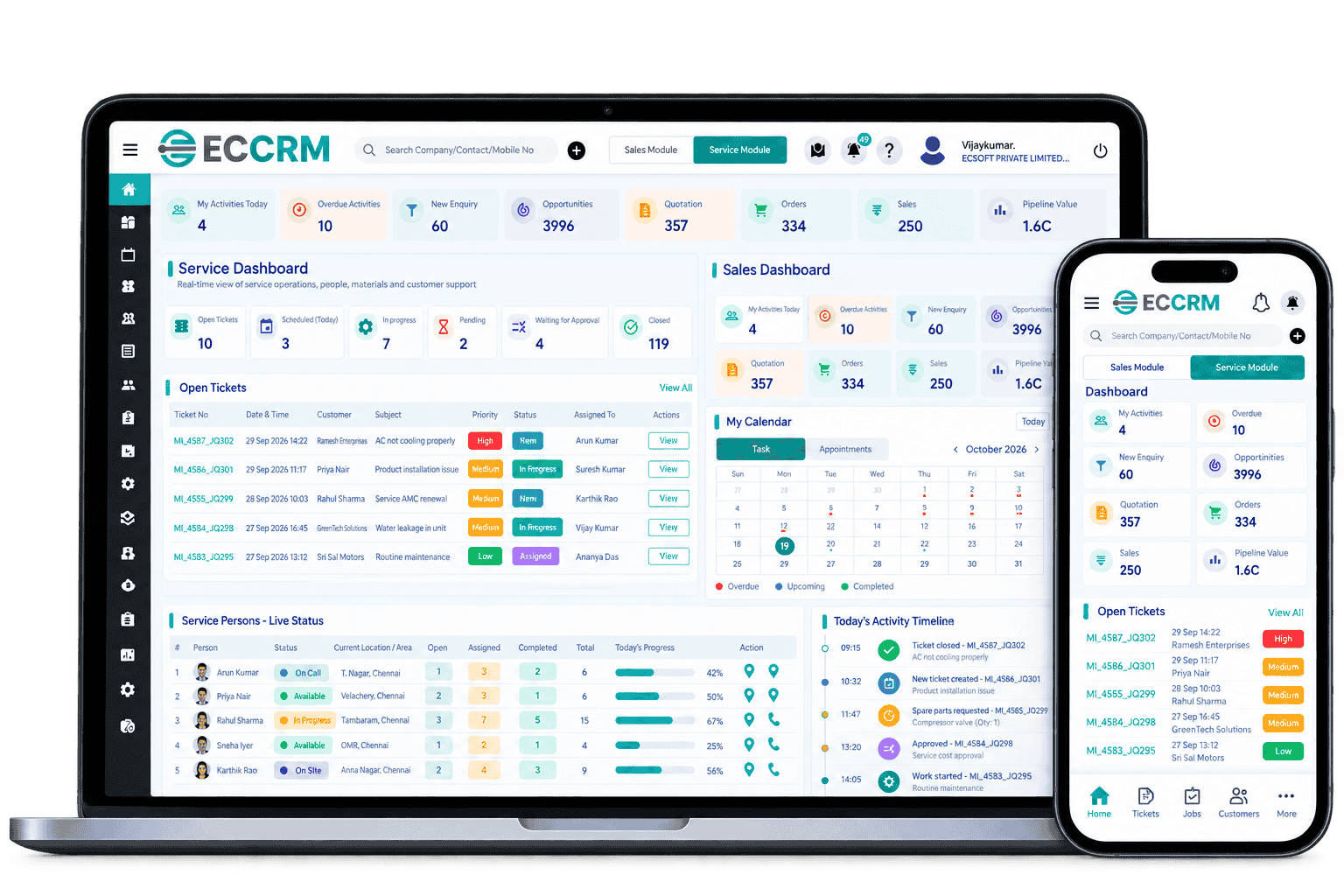
CRM Software helps businesses manage customer relationships by connecting sales, service and field service operations in one platform. Keep customer information, enquiries, quotations, follow-ups and service requests organized instead of scattered across spreadsheets and disconnected apps. ECCRM supports lead management, sales pipeline tracking, service workflows, technician coordination and mobile CRM apps—giving growing and B2B businesses better visibility across customer interactions.
Years of Experience
Happy Customers
Countries
Multiple Industries
A customer relationship does not begin and end with a sales transaction. It develops through enquiries, discussions, quotations, purchases, service requests and ongoing communication.
When different teams maintain separate customer records, important information can become fragmented. A connected CRM platform provides a more organised way to manage these interactions.
ECCRM Software brings together sales and service capabilities to help businesses manage customer information and related business activities throughout the relationship.
Bring every important customer-facing activity into one connected workflow.
Organise potential customer information and maintain records of business enquiries.
Track lead details, customer requirements and sales follow-up activities.
Maintain account information, contacts and relevant customer interaction records.
Monitor opportunities, sales activities and progress through your sales process.
Organise customer quotations and sales order information.
Record service requests, complaints, tickets and related activities.
Manage work orders, technician activities and field service requirements.
Organise AMC, warranty and service contract information.
Discover how ECCRM brings sales, service and field operations together.
CRM stands for Customer Relationship Management. CRM software is a business application that helps organisations manage customer information, sales relationships, customer interactions and related business activities through a centralised system.
A CRM system provides a structured way to manage information about leads, prospects, customers and business accounts. It helps employees understand customer requirements, monitor sales opportunities, maintain interaction records and coordinate customer service activities.
Instead of depending entirely on spreadsheets, individual files and disconnected communication channels, businesses can use CRM software to create a more organised approach to customer management.
Explore the key functions that help businesses organise customer relationships and daily operations.
Maintain customer accounts, contacts and key details.
Organise enquiries and track potential customers.
Monitor opportunities and track sales progress.
Plan follow-ups, meetings and team activities.
Manage quotations and sales order information.
Maintain relevant customer communication records.
Record, assign and track service requests and tickets.
Manage work orders, technicians and field activities.
Maintain AMC, warranty and service contract details.
Give sales and service teams access on the go.
Review sales, service and operational information.
Choose CRM based on your business requirements. The exact capabilities vary between CRM providers. Evaluate a CRM solution based on the workflows your business needs to manage, rather than selecting software based only on the number of features advertised.
As a business grows, managing customer relationships becomes more demanding. More enquiries arrive, sales teams handle more opportunities, customers expect consistent communication and service teams manage an increasing number of requests.
Without a structured process, important information can be overlooked. A business CRM system helps establish a common approach to managing customer-related activities.
Maintain customer accounts, contact details and relevant business records in an organised CRM database.
Organise enquiries and prospect information so sales representatives can track potential customers and manage the next steps.
Plan sales tasks, appointments and customer follow-up activities. Give representatives better visibility into pending actions and commitments.
Monitor sales opportunities and their progress through different stages. Help managers identify deals that need attention.
Maintain relevant customer information and interaction history so employees can approach conversations with better context.
Manage service requests, complaints, tickets and work orders through structured service processes.
Give sales and service teams a more connected way to manage customer-related information and activities.
Use organised business information and available reports to review activities, monitor progress and identify areas that need attention.
A CRM system is not simply a customer database. It is a practical way to organise the activities that help a business acquire, serve and retain customers.
The right CRM software should support the actual work your employees perform every day. Before choosing a CRM platform, understand which features are essential to your sales process, customer management requirements and service operations.
Lead management helps businesses organise potential customer enquiries and track their progress through the sales process.
How ECCRM helps: ECCRM provides lead management capabilities to help sales teams organise enquiries and manage potential business opportunities.
Contact and account management helps organisations maintain customer records and associate relevant contacts with business accounts.
How ECCRM helps: ECCRM supports customer account and contact management, helping teams maintain organised customer information.
A sales pipeline provides visibility into the progress of business opportunities and helps managers review the status of ongoing sales activities.
How ECCRM helps: ECCRM supports sales opportunity and pipeline management to help businesses organise their sales process.
Sales representatives regularly manage calls, meetings, appointments and follow-up activities. A structured system helps keep track of pending customer commitments.
How ECCRM helps: ECCRM supports tasks, appointments and sales follow-up activities to help teams manage their daily work.
CRM software should help businesses organise quotation requests, commercial discussions and sales orders, and maintain continuity between enquiries and sales transactions.
How ECCRM helps: ECCRM supports quotation and sales order workflows for businesses managing customer enquiries and sales transactions.
Businesses need an organised process to manage questions, complaints, service requirements and support requests after a purchase.
How ECCRM helps: ECCRM provides Service CRM capabilities to organise customer service requests and related activities.
Field service management connects customer service requirements with the people responsible for completing the work and provides visibility into field activities.
How ECCRM helps: ECCRM supports field service workflows, work orders, technician activities and GPS-based technician location tracking during logged-in hours.
Businesses providing maintenance services need to maintain information about annual maintenance contracts, warranty coverage and ongoing customer commitments.
How ECCRM helps: ECCRM supports warranty and contract management to help businesses organise ongoing service commitments.
Mobile CRM applications help sales representatives and service technicians access relevant customer and business information while carrying out their responsibilities.
How ECCRM helps: ECCRM provides dedicated Android applications for sales and service teams.
CRM reports help businesses review available information, understand activity progress and identify areas that require attention.
How ECCRM helps: ECCRM supports sales and service reporting to help businesses review their operational activities.
Reading about CRM features is useful, but seeing the actual software can help you understand how it fits your business. Explore how ECCRM supports customer management, sales activities, service workflows and field operations.
Explore how customer records, enquiries and lead information are organised in ECCRM.

See how ECCRM brings sales and service activities together.
Watch on YouTube ↗ECCRM Mobile CRM gives sales and field teams access to customer information, enquiries, tasks, follow-ups and quotations while they are away from the office. Teams can stay connected with customer activities and sales operations from their mobile devices.
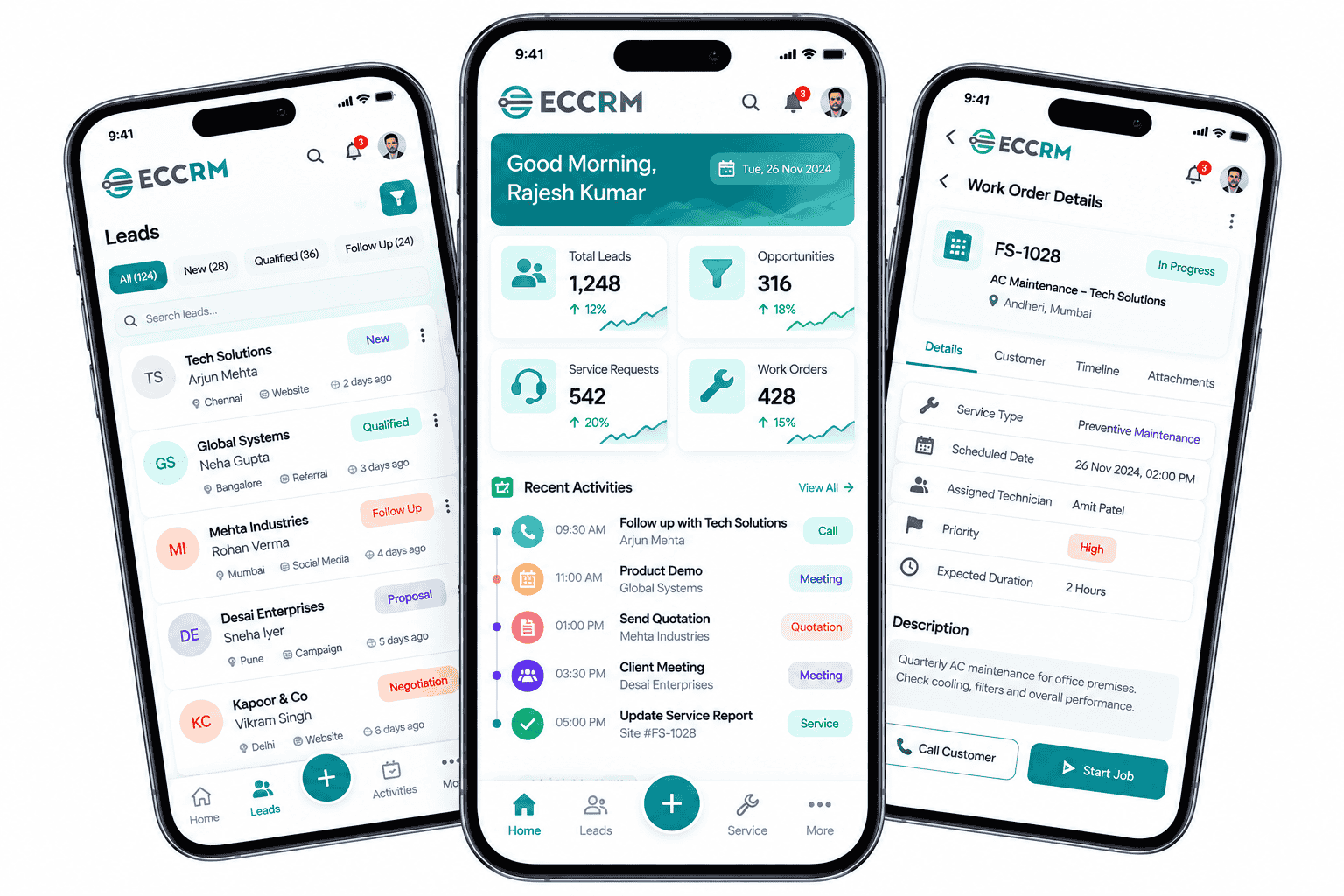
Connect customer acquisition, sales activities and ongoing service operations through one organised CRM environment.
Some organisations need a CRM system primarily for sales. Others need customer support and field service management. Businesses with both sales and service teams need a solution that can support the complete relationship.
Consider a business that sells equipment and provides ongoing maintenance.
The sales team manages the enquiry, customer information, quotation and order. Once the customer purchases the equipment, the service team may handle maintenance requests, warranty information and technician visits.
If customer information is disconnected, teams may need to repeatedly search for details and previous activities.
A connected CRM environment provides a more organised way to manage these different stages.
ECCRM provides flexible CRM solutions for businesses with different sales, service and customer management requirements. Industry-specific workflows can be configured around the way your teams operate.
Discover how CRM software helps businesses organise everyday sales, customer service and field operations through connected workflows.
A potential customer contacts a company about a product or service.
The sales team records the enquiry, maintains prospect information, plans a follow-up and monitors the opportunity.
The enquiry becomes part of an organised sales process rather than remaining an isolated conversation.
A customer requests a commercial proposal.
The sales representative manages the quotation, records relevant sales activities and monitors the opportunity's progress.
The team has better visibility into quotations and the next actions required.
An existing customer contacts the company with a service issue.
The service team creates a service ticket, records the requirement and manages the related service activity.
The request is handled through a structured service process with relevant records.
A customer needs an engineer to visit their location.
The service team manages the work order and coordinates the field activity. Relevant technician location visibility can be supported through GPS tracking during logged-in hours.
Service managers have better visibility into field activities and related work records.
A customer has an ongoing maintenance agreement.
The business maintains the relevant contract, warranty and service information.
The organisation can keep ongoing customer service commitments better organised.
Spreadsheets can be useful for basic customer lists and simple record keeping. However, as the number of customers, employees and business activities grows, maintaining information across multiple files can become difficult.
A CRM system provides a more structured environment for managing customer relationships.
Understand how customer-related activities are managed.
| Business requirement | Spreadsheets & Manual Processes | CRM Software |
|---|---|---|
| Customer records | Maintained across files | ✓ Organised CRM database |
| Lead tracking | Manually updated | ✓ Structured lead management |
| Follow-ups | Separate reminders and calendars | ✓ CRM activity management |
| Sales opportunities | Manual status updates | ✓ Pipeline and opportunity tracking |
| Quotations | Separate transaction records | ✓ CRM quotation workflows, where supported |
| Service requests | Separate registers or messages | ✓ Service ticket management |
| Field operations | Manual coordination | ✓ Work order and technician workflows |
| Customer history | Requires manual searching | ✓ Organised customer-related records |
| Management review | Manual compilation | ✓ Available CRM reports and dashboards |
It is to establish a reliable process for managing customer-related work as the business grows.
Choosing the best CRM software requires more than comparing feature lists. A solution that works well for a small sales team may not be suitable for a business managing service engineers, AMC contracts and customer support operations.
10 important areas to evaluate before making your decision
Evaluate how it handles leads, contacts, opportunities, quotations, service requests and ongoing relationships.
Consider whether you operate in B2B sales, manufacturing, distribution, equipment maintenance, field service or another industry.
Understand how sales representatives, service employees and managers use the platform and access relevant information.
If your employees work outside the office, evaluate the mobile applications and the workflows they support.
For service-oriented businesses, evaluate tickets, work orders, technician coordination, service history, AMC and warranty management.
Understand which reports are available, whether they cover the information your managers need and whether they can support your review process.
Discuss setup, configuration, training, data migration and ongoing support with the provider. Confirm the scope, responsibilities and costs before proceeding.
Ask about hosting, access permissions, authentication, backups, data protection, retention, export options and relevant compliance requirements.
Evaluate the full cost, including licensing, users, implementation, customisation, training, support and any additional services.
Request a live demonstration. Test the workflows that matter to your team rather than making a decision based only on screenshots or feature descriptions.
It should be practical for your employees and provide the capabilities your organisation actually needs.
ECCRM specializes in Custom CRM Software Development for the unique business needs. Our team collaborates and provides solutions that enhance customer relationships and streamline processes with flexible CRM systems, including Mobile CRM Development to manage leads, automate marketing, and improve collaboration for lasting success.
Adapt your CRM Software to the way your business works — from customer fields and approvals to workflows, reporting and integrations.

ECCRM can work as part of your wider business technology environment. Connect customer and operational information with the systems your teams already use to create a more connected workflow.
Build your CRM environment around controlled access, traceability, data protection and reliable day-to-day operations.
Role-based access for the right users.
Controlled AccessSecure business information and access.
Protected DataBackup practices designed for data safety.
Data ProtectionGranular control over module access.
Multi-Level AccessTrack important activities and changes.
Activity TraceabilitySupport smooth and stable operations.
Stable OperationsOur CRM Software is designed for businesses that need sales, service and field operations to work together rather than operate as disconnected systems.
Built on more than 25 years of experience developing business software and solutions for different operational requirements.
Connect lead management, customer follow-up, quotations, service requests and field operations through one connected CRM.
Give salespeople and service teams access to customer information, tasks and operational updates wherever work happens.
Configure fields, workflows, approvals and operating processes around the way your business actually works.
Organize CRM operations around industry-specific processes instead of forcing every business into the same generic workflow.
Move from setup to everyday usage with implementation guidance, customization support and assistance for your operational requirements.
From understanding your business requirements to configuring the CRM and training your team, CRM Software System provides a structured path to implementation.
We understand your sales, service and field operations before recommending the right setup.
Explore the workflows, dashboards and features that match your business requirements.
Configure fields, workflows, approvals and modules around the way your business operates.
Help your teams understand the system and confidently adopt their day-to-day workflows.
Move your operations into ECCRM and continue with support as your business grows.
Tell us what you want to manage and we'll help you identify the right ECCRM approach.
Find answers to common questions about CRM software, its features, benefits and how ECCRM supports sales, service and field operations.
Talk to our team and discover how ECCRM can support your sales, service and field operations.
A unified CRM for sales, service and field operations to manage customers, boost team productivity and deliver better service.
Sales, Service Operations & Field Teams.